Important Concepts

Preferred Identities

GOnnect supports multiple preferred identities that allow callers to present different identities to callees based on the dialed number. This is useful for enterprises that want to route calls through different outbound numbers based on the destination.
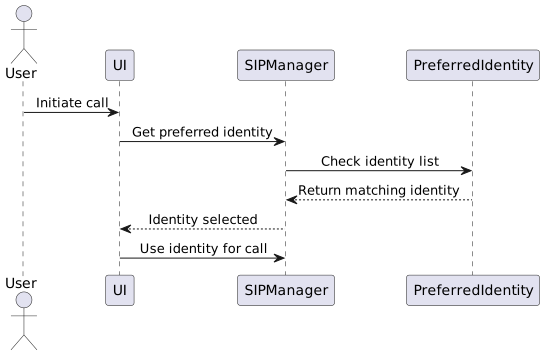
Identity Selection Algorithm

Diagram

Identity Configuration

Field Description Example

enabled

Whether the identity is active

true

automatic

Whether identity is auto-selected

true

name

Display name in UI

"Support Line"

identity

SIP URI for this identity

sip:support@example.org

prefix

Number prefix for auto-selection

+492913641

Buddy State Management

GOnnect tracks the availability state of contacts through SIP SUBSCRIBE/NOTIFY mechanism. This enables presence awareness in the contact list.
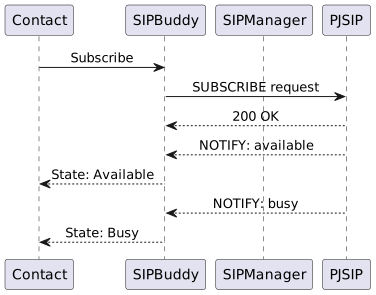
Buddy State Flow

Diagram

Buddy States

State Description Icon

Available

Contact is online and available

Green dot

Busy

Contact is on a call

Red dot

Away

Contact is away

Yellow dot

Offline

Contact is offline

Gray dot

Unknown

State not known

Question mark

Contact Source Federation

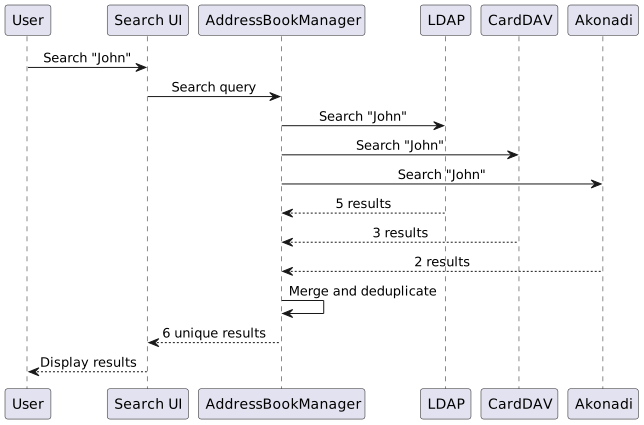
GOnnect aggregates contacts from multiple sources into a unified view. Each source can have different priorities and display names.

Contact Merging

Diagram

Source Priority

Source Default Priority Configurable

LDAP

50

Yes

CardDAV

50

Yes

Akonadi

25

Yes

EDS

25

Yes

CSV

10

Yes

Call Quality Metrics

GOnnect provides detailed call quality information using RTCP XR (Extended Reports) and PJSIP’s built-in quality metrics.

Quality Metrics

Metric Description Scale

MOS-TX

Mean Opinion Score - Transmission

1.0 - 5.0

MOS-RX

Mean Opinion Score - Reception

1.0 - 5.0

Loss-TX

Packet loss rate - Transmission

0% - 100%

Loss-RX

Packet loss rate - Reception

0% - 100%

Jitter-TX

Jitter - Transmission

0 - 500ms

Jitter-RX

Jitter - Reception

0 - 500ms

Delay-TX

One-way delay - Transmission

0 - 500ms

Delay-RX

One-way delay - Reception

0 - 500ms

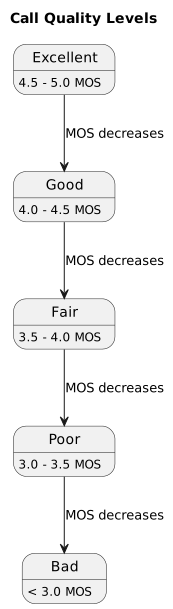
Quality Level Classification

Diagram

Security Architecture

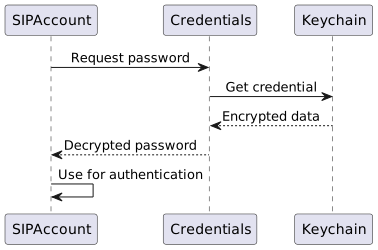
Credential Storage

Diagram

Encryption Layers

Layer Protocol Purpose

Signaling

TLS 1.2+

SIP message encryption

Media

SRTP

RTP/RTCP encryption

Credentials

Keychain

Password storage

Config

File permissions

Config file protection

Emergency Call Handling

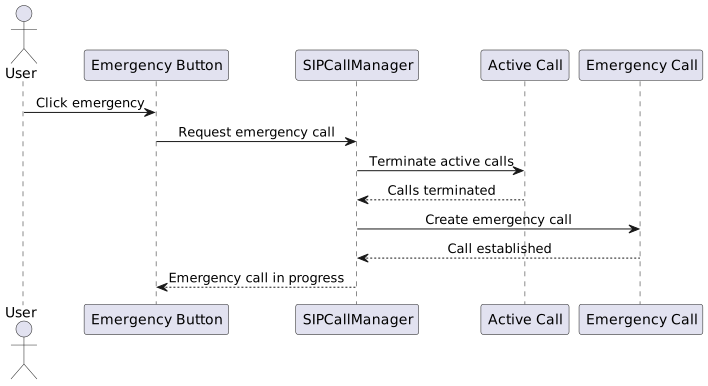
Emergency calls have special handling to ensure they are always prioritized and can override ongoing calls.

Emergency Call Flow

Diagram

Emergency Number Configuration

Field Description Example

number

Emergency number

112

displayName

Display name

"Firefighters / Medical"

priority

Call priority

High

Jitsi Meet Integration

GOnnect can upgrade SIP calls to Jitsi Meet video conferences when both parties support it.
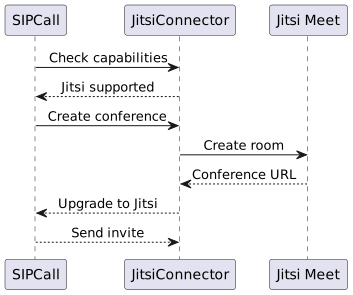
Jitsi Integration Flow

Diagram

Jitsi Configuration

Field Description Example

url

Jitsi server URL

https://meet.example.com

displayName

Display name in Jitsi

"GOnnect User"

preconfig

Show pre-join screen

false

authorizationMode

Authorization method

none

muc

Jitsi MUC for dial-in

conference.meet.jit.si

Plugin Architecture

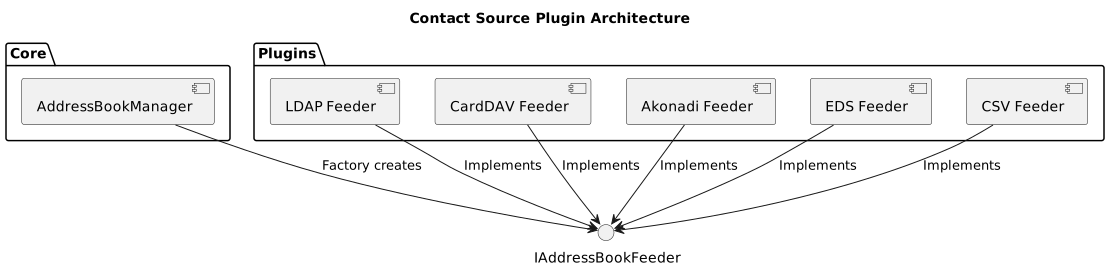
GOnnect uses a plugin-based architecture for contact sources and chat plugins.

Contact Source Plugins

Diagram

Plugin Lifecycle

Phase Action Description

Load

Initialize

Load plugin library

Configure

Apply settings

Read configuration

Start

Begin fetch

Start data synchronization

Stop

Cleanup

Release resources

Unload

Destroy

Unload library

State Management

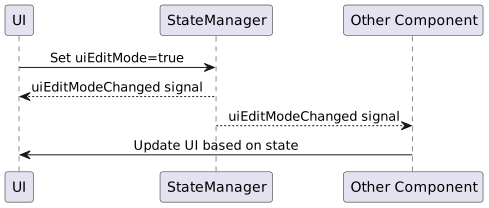
StateManager provides a centralized way to manage application state and coordinate between different components.
State Properties

Property Type Description

globalShortcutsSupported

bool

System supports global shortcuts

uiEditMode

bool

UI is in edit mode

uiHasActiveEditDialog

bool

Edit dialog is open

globalShortcuts

QVariantMap

Custom shortcut mappings

State Change Flow

Diagram